
Release Notes - July 2026
Tuesday 04 August 2026, 1015pm Simplifi
Wednesday 05 August 2026, 1015pm OnTask
New Features & Enhancements
Employee Start Date
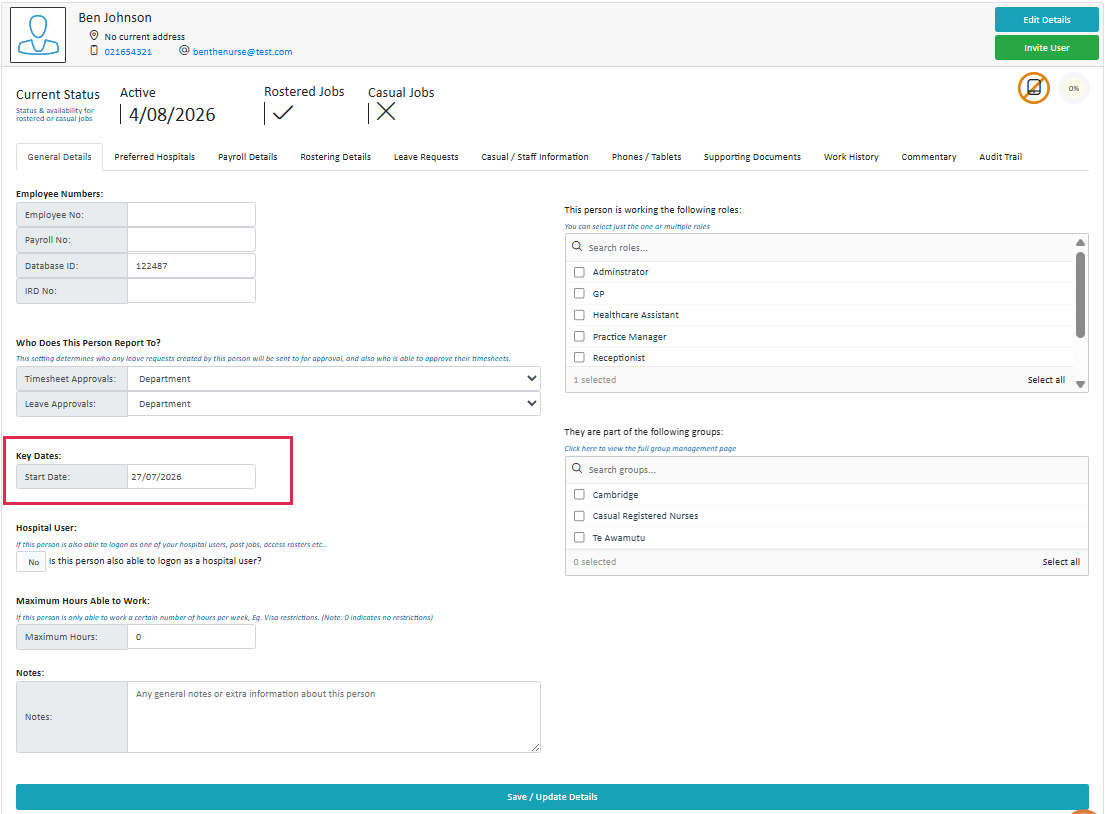
We've added a Start Date field to the General Details tab of the Staff Profile, for use when a staff member's start date differs from their "active" date.
- Staff can no longer be rostered onto a shift (manually or automatically) before their recorded start date.
- Contracted hours set up in advance of a staff member's start date will apply correctly once that date is reached.
Kiosk Fix: Open Timesheets Now Always Visible
We have fixed a Kiosk issue where a staff member has forgotten to clock-out more than two days ago blocked staff from clocking into their next shift. The active open timesheet now always shows on the Kiosk regardless of age. Staff must remove entries in strict reverse order (clock-out before clock-in, working backward across timesheets), preventing invalid multi-clocked-in states.
New Checkbox-Style Multi-Select Fields
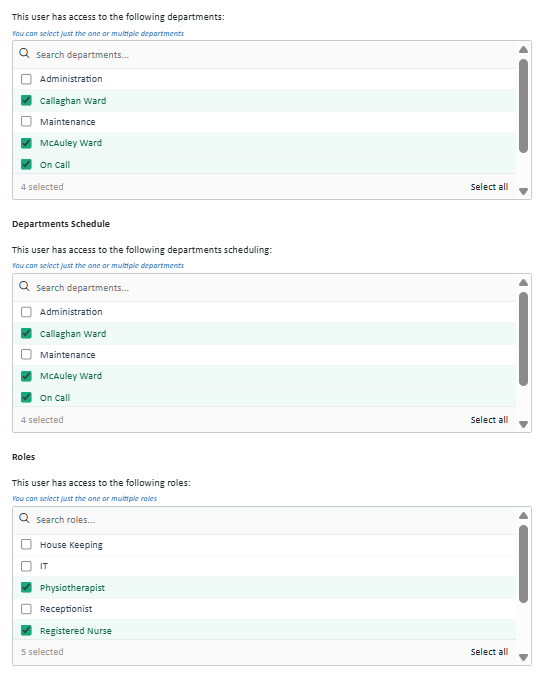
We are refreshing multi-select fields across Simplifi with a cleaner checkbox format — tick options straight from the list, search to narrow long lists, and select/deselect all with one click.
Payroll Reports - Datacom Clients Employee Code
The Employee Code column on Datacom client payroll reports now shows the staff member's actual payroll code alongside the API override code.
Reason required when unassigning a casual employee
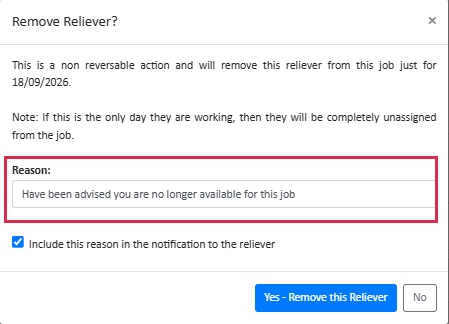
When unassigning a casual employee from a job, you'll now be prompted to enter a reason. This reason is included in the notification sent to the staff member, and is also recorded in the audit trail.
If you'd rather not share the reason with the staff member, there is an option to withhold it from their notification — it will still be logged in the audit trail. If no reason is entered, both the notification and audit trail will show "No reason provided."
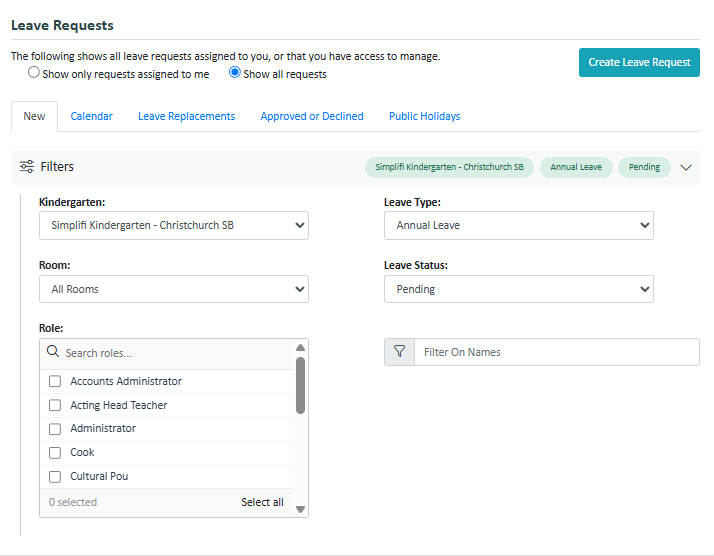
Schedule & Leave: New Collapsible Filters
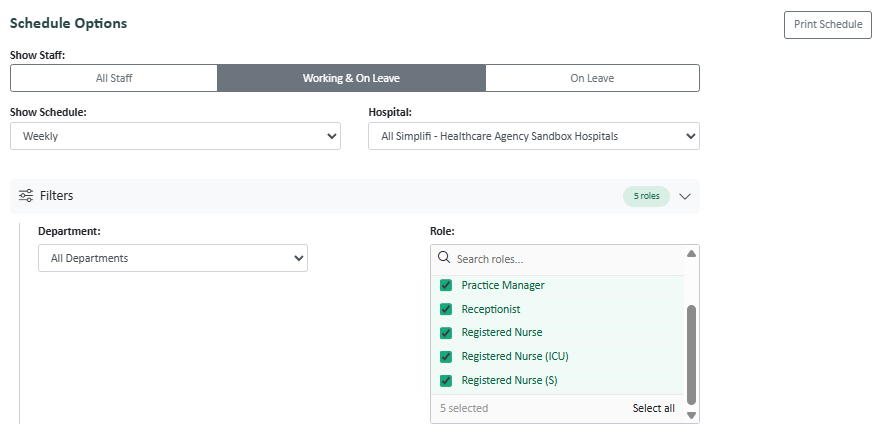
We've redesigned the filters on both the Schedule and Leave pages to make them tidier and faster to use.
What's changed:
- Filters now live inside a collapsible panel that stays out of the way until you need it.
- On the Schedule page, the view selector and Location/Site filter stay visible outside the panel (since they're used constantly), while Department and Role sit inside it.
- On the Leave page (and the Leave Requests tab in Staff), filters are grouped the same way, and adjust to make better use of space if your organisation doesn't use certain filters.
- There is a new filter option for Head Office users to be able to filter leave requests by Site.
- Filter pills now show which filters are currently active, so you can see your selections at a glance.
- You can clear filters by pressing Escape.
Staff Org Status
The "Inactive" status has been removed. Staff members are now categorised as either "Active" or "Terminated".
Staff Export File - Roles View
Roles are now exported as a single column listing all relevant roles per person, rather than separate "Yes"/blank columns for each role.
Primary role is an additional column that we have added for organisations using this option.

Bug Fixes
- Alerts for contracted hours not working as expected
- API 500 error issues
- Contracted hours - hours total incorrectly with default breaks turned off
- Contracted Hours -Flag Redo on Rotation Weeks Change
- Copy contracted hours function doesnt copy valid to dates
- CSV Payroll Same-Day Amendment - Staff User Role Check
- Duplicate Accounts Caught in Cross-Over/Name Match
- Error when staff member trying to modify timesheet time details
- Error when trying to update Registration details
- Groups have disappeared for School
- Head Office Public Holiday Propagation Job-Invalid Dictionary Keys
- Leave Filters - Leave requests created on behalf don't work for rooms
- Leave Filters - Preexisting bug with HO/Local
- Leave Liability reports are blank when run at a local site
- Leave Request Hours -Prevent Double-Counting from Recreated Contracted Hours Timesheets
- Staff not showing in correct payroll reports
- On call time is being calculated in leave balance
- OnCall shifts dont show in staff schedule view for todays schedule
- Overnight Availability Checks - De-duplicate Matching Before/After Midnight Warnings
- Overnight Shift Calculations -Incorrect Remaining Hours Logic
- Paid night-shift breaks flagged as false contracted-hours mismatch in Roster views
- Payroll Module - Filtering issue
- Payroll Rules Selection not applying correctly
- Payslips Not Displaying - Archived Pay Calendar Name Collision
- Projected Balance Issue - conflict between requests
- Publishing a new job from a previously filled job hides the new timesheet.
- Registration Wizard -Address Autocomplete Race Condition Fix
- Relievers Tab -Profile Box Display Issues
- Report Option settings
- Requested Relievers are not showing in the Staff Summary
- Room Forecasting Null Objects
- Roster Generation -Residual Week Data Bleeds Through After Switching 3-Week to 2-Week Rotating Roster
- Schedule View Dept not showing in Filter for User
- Schedule: "only show leave' toggle broken in daily
- SSO Response parsing improvements
- Staff cant view/set alternate email as the preferred in profiles
- Staff module - Searching payroll IDs
- Staff View Save/Validate -Prevent Implicit Form Submission on Enter Key
- T&A reporting: no content for single staff member
- Tidy up attendance button on Work History 1
- Time out errors
- Timeouts when saving Contracted Hours
- Wire-up Skill Sets
- Workflows Causing Staffing Module Error