
Release Notes - April 2026
Tuesday, April 28 2026, at 10:15pm
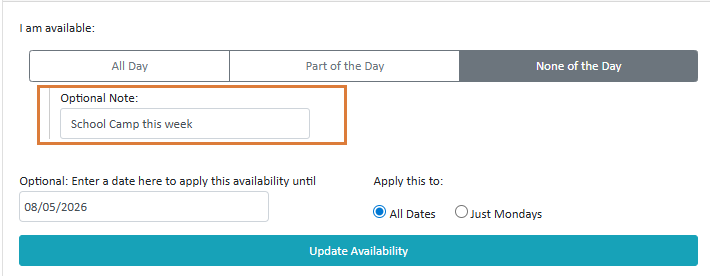
Casual Staff Availability - Optional Note Field
Casual staff can now record a note when they have selected Part of the Day or None of the Day availability.
The note will also show up as a tooltip when org staff are looking at staff availability when hovered over with pointer.
Consolidated Rostering Report
A new report showing hours worked per department per day. Available for a selected date range.
Head Office Reports – Site Selection
When running reports at the Head Office level, users can now choose to run for all, individual, or selected sites.

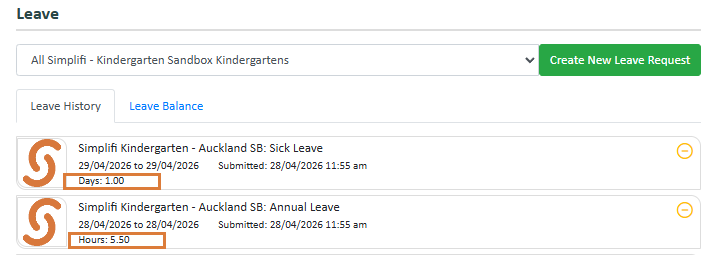
Leave Request – Leave Units Display
The Leave Request tile now displays the Leave Units applicable to the selected Leave Type for Staff. This gives staff visibility of the leave unit type, helping to identify any obvious submission errors.
Password Security & Account Onboarding Improvements
We are making some upgrades to how passwords are stored and how staff accounts are set up. This only applies for Clients not using SSO.
Staff Onboarding Staff imported via CSV or Payroll Sync will no longer receive a generic default password. Instead, they'll receive an invite email prompting them to set their own password.
First-Time Login Any staff member or user logging in with a temporary or weak credential (including an OTP) will be required to set a new password before they can proceed.
One-Time Passwords (OTP) Administrators can generate an OTP as an alternative to email-based invites — useful when a staff member's email is unavailable. OTPs expire after 24 hours by default.
Public Holiday Settings
Public holiday settings are now managed at the staff member level rather than on individual timesheets. For most clients, day-to-day use will feel the same — the main things to be aware of:
- The "Manually Maintained" option has been replaced by an override toggle on each timesheet. It does the same thing, just looks different.

- New status icons in the Leave module show at a glance if anything needs attention — a red exclamation means a timesheet is overridden and won't be affected by setting changes; a yellow icon means approved leave is present.
- Approved leave on a public holiday is automatically converted to the public holiday leave activity.
- Mondayised holidays — only one of the two days can be "Observed" at a time. Changing one will automatically update the other.
Rostering Screen - Pending Leave
Pending leave requests will now be indicated in the rostering screen.

Site-Level Break Replacement Settings
Break replacement settings can now be configured at the individual site level. Previously, this was set at Head Office only. Sites can now define their own break replacement rules, giving organisations greater flexibility to meet the specific needs of each location.
Staff Export – Active Sites Column
The staff export file now includes a column showing the sites at which each staff member is currently active.
Time & Attendance Report - Availability
The Time & Attendance Report has been expanded and is now accessible to all organisations.
Previously limited to organisations with clocking enabled, the report can now be used by any organisation for general timesheet reporting purposes.
Time & Attendance Report - Paid Break and Contracted Hours Columns
We have added columns for Total Paid Break and Contracted Hours to this report.
Time & Attendance Report - Department Summary Tab
A new tab has been added for times worked in departments. This will show time spent in each department.
Bug Fixes
The following software bugs will be resolved as part of this release. The items listed below are the titles of the related jobs. If you would like more detail on any of these fixes, please refer to your organisation’s Monday.com board or contact us directly.
- API Requests Bulk Screen
- Archived Region cleanup
- Drag and Drop Document Issue
- Kiosk V2 Bugs 1
- Leave on Calendar issues
- Leave Request Calculations with Contracted Hours
- Leave Requests not reapplying to regenerated Contracted Hours
- Leave without Pay totals not coming into Total Leave Taken Report
- Payroll Group Syncing
- Print Roster not filtering shifts by room
- Print Roster Preview shows roster for week after dates entered
- Recording as Leave on Public Holidays causing errors
- Reliever was able to accept job and was assigned to job after the job finish time
- Staff not showing in Public Holiday module if Timesheet starts day before
- Terminated employees not showing in past weekly schedules
- Terminated staff not being removed from roster if InfoCare pending
- Timesheet Information Collected selection issues
- Web Requests Export Headers are misaligned


