
Release Notes - July 2025
Wednesday, July 30, 2025, at 10:15 PM.
Email Notifications for changes made to Compliance Answers
You can now enable email notifications for any changes to compliance-related answers.
When setting up compliance questions, users can choose a specific person to be notified if an answer is updated. While this functionality previously existed for date-based questions approaching expiry, it has now been extended to all compliance question types.
This enhancement ensures that responsible parties are immediately alerted to any changes that could impact compliance and can take timely action to re-verify critical information.
Leave Attachment Upgrades
We've made improvements to the Leave module to offer greater flexibility with managing attachments:
Staff can now upload attachments to leave requests even after they have been processed. This allows users to provide additional documentation (e.g. medical certificates) if it becomes available at a later date.
Managers are also able to add attachments to the original leave request. This ensures all relevant information can be recorded and maintained in one place, even after approval.
Restore Assigned Jobs post Staff Termination
We’ve added an update to how the system handles staff who are terminated and then reactivated.
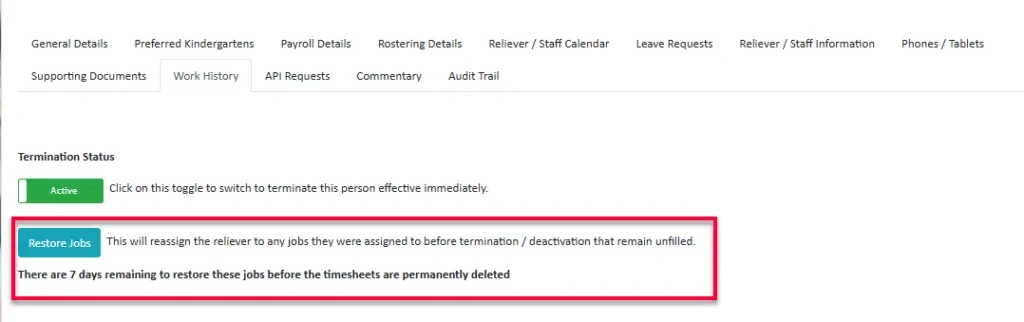
A new "Restore Jobs" option has been added beneath the Termination Status button, allowing users to reassign temp staff to jobs they were removed from at the time of termination or deactivation. This option will only be available for 7 days following termination.
This option will only display if both of the following conditions are met:
- The temp staff member is currently active but was terminated or deactivated within the past 7 days.
- At the time of termination/deactivation, the staff member was removed from one or more jobs that are still unfilled.
The section will also show a countdown of how many days are left to restore the jobs before the archived timesheets are permanently deleted.
'Same As' function for Copying Contracted Hours
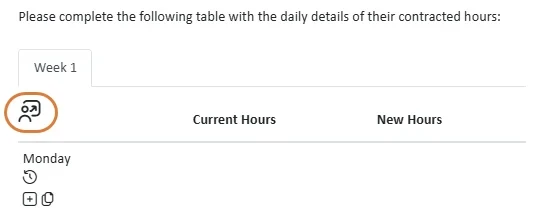
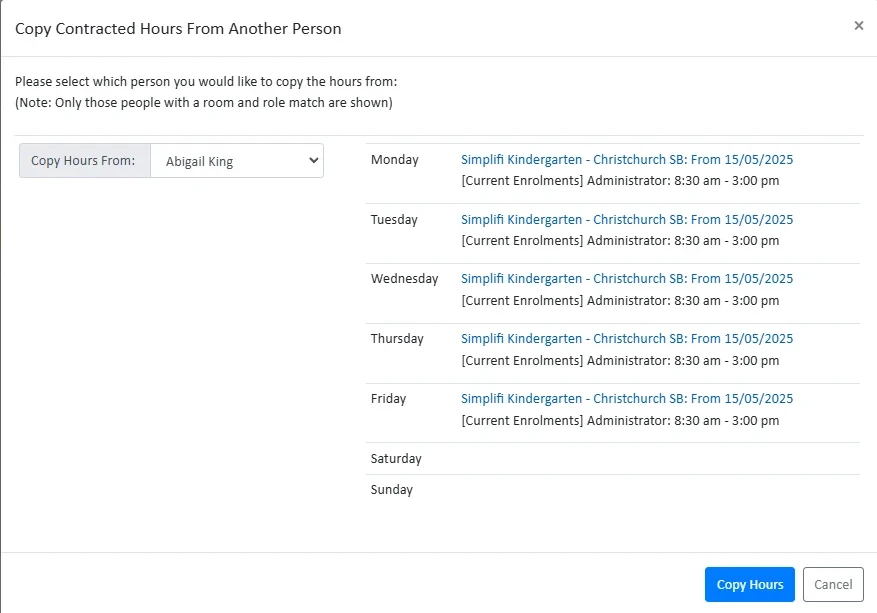
Users will now have an option to copy contracted hours from another staff member who shares the same department and role. When setting up contracted hours at the site level, the system displays the staff member’s current contracted hours and upon selecting Copy Hours the copied hours will be transferred across. The hours will not be copied across if there are any overlapping or conflicting times.
Staff View Filter to Show On Roster Staff
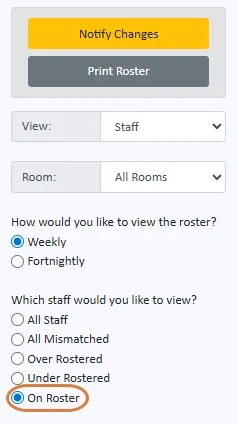
A new filter option has been added to the Staff View in the Rostering module. Users can now choose to display only staff who are rostered to work during the selected period.
Improved Compliance Role Checks for industry questions
Previously, the Compliance dashboard only displayed questions based on the roles selected by a staff member in their profile. If these roles differed from those assigned at the organisation level—such as industry roles versus site-specific roles—there was a risk that some compliance checks could be missed.
The system has now been enhanced to also consider roles assigned at the organisation level. If a relevant role is identified there, the appropriate compliance questions will be included on the dashboard to ensure full coverage.
Override Access Settings for Industry-Level Questions
Organisations can now override the default settings for User Access and Show this field at all your orgs on Industry Questions. This provides greater flexibility for organisations that manage staff locally at individual sites rather than centrally through Head Office, while still allowing them to create questions that apply across all locations.
To reduce confusion, the Show this field at all your orgs toggle will now be hidden when staff are managed at Head Office. In these cases, all staff have a Head Office profile and will receive the question automatically, regardless of this setting.
Timesheet Fields that Staff can Complete
This release introduces the ability for staff to complete any configured timesheet fields. Staff can now fill out these fields via the browser, mobile app, or kiosk.
Timesheet fields can only be edited before the timesheet has been processed and—if required by your organisation— the staff member has clocked in. Once the timesheet is processed, any entered answers become read-only.
Shift vs. Timesheet
This release brings a new shift field to a timesheet, you can select a new shift, and the hours worked will automatically adjust. Timesheets now associate with the shift they are assigned to, regardless of the time entered. They will no longer match to a shift based on time alone.
The Shift field on the timesheet will only appear when there are available shift options to choose from.
Bug Fixes
The following software bugs will be resolved as part of this release. The items listed below are the titles of the related jobs. If you would like more detail on any of these fixes, please refer to your organisation’s Monday.com board or contact us directly.
- Schools Weekly Schedule View
- Teacher Registration Number Not Displaying in Reliever Information Tab
- Remedi - Inconsistencies with Job Notification
- Reliever Verification Status Not Updating Correctly
- VINZ - Regional Public Holiday not Showing up
- Shifts applying to one role in all departments, when only one selected dept selected
- Role filters removed for Contracted Hours and Staff roster views
- Leave type didn't update correctly after timesheet modification
- Shadow email search bug relating to SS-3882
- NZ Teacher Number Lookup bug
- Leave can't be saved or declined if overlapping approved request exists
- New leave requests created whenever timesheet modified
- Replacement timesheets being deleted if associated leave declined, even if worked
- Head Office not able to view schedule for all organisations
- "All Organisations" option creating HO leave request when there are no hours
- TempStaff can't be deleted despite no TimeSheets or Contracted Hours
- Shift swaps only showing from start of current month
- User Export columns not matching with data due to Quick Roster
- Error not showing when attempting to create a reliever group with duplicate name
- Extend duplicate group name errors to include Head Offices
- Allow users to view additional messages attached to notifications in Messaging
- Users can't view emails in the Messaging module more than once
- Export Store Manager Report - missing user emails
- Default rosters used for timesheets even when different times are specified
- If a role is used in two rooms with separate shifts the headers are incorrect


