
Release Notes - June 2025 - FULL RELEASE
Wednesday, June 25, 2025, at 10:15 PM.
Employee Self Service - Leave Balance Visibility
Previously, the Employee Self Service only displayed leave balances when staff initiated a new leave request.
With this release, employees can now view a clear and detailed breakdown of their leave entitlements at any time via the new Leave Balance tab, located within the Leave section.
Images: Coming Soon
Importing Contracted Hours via CSV
Previously, clients were able to use the File Import Templates in Our Profile to configure imports for setting up new employees, including their initial profile configuration and leave balances. This has been a key feature for clients whose payroll systems do not support API integrations.
With this release, you can now also use the File Import Templates to configure the import of contracted hours (repeating master rosters) directly onto staff profiles.
As this requires some specialised setup, please get in touch with us for assistance if you wish to make use of this feature.
Leave Changes
Multiple Leave Requests for the Same Time
Current System
Allows multiple leave requests to be submitted for the same time period. The first approved request is reflected on the timesheet.
Modification
Simplifi will not allow an employee to submit a leave request for a time slot if there is already an approved leave during that period.
Leave Request vs Manual Modification
Current System
If a pending leave request exists and a manager manually modifies the timesheet to record leave, the system automatically approves the pending leave request — even if it’s for a different type of leave.
Modification
Manual modifications will not affect an employee’s submitted leave request.
In this scenario, the employee’s leave request will remain pending, and the manual modification will create an additional manual leave entry.
All Employees Sync - API
The All Employees API sync has been updated to only update existing employees in the system. It will no longer create new employee records.
Any new employees will now be brought into the system exclusively via the New Employees sync.
Audit on Changes made to Department Details
A new audit trail has been introduced to track key changes made to department detail.
The audit log now records the following actions:
- Changes to archive status
- Updates to payroll codes
- Changes to department managers
- Modifications to user access (who can view or manage the department)
- Adjustments to clock in/out settings
To view audit logs, navigate to the Our Profile >> Rostering Settings >> Department Details and click on the Audit Trail tab.
Clock In/Out for Paid Breaks Now Visible in Schedule View
The Schedule View now includes clock in/out times for paid breaks.
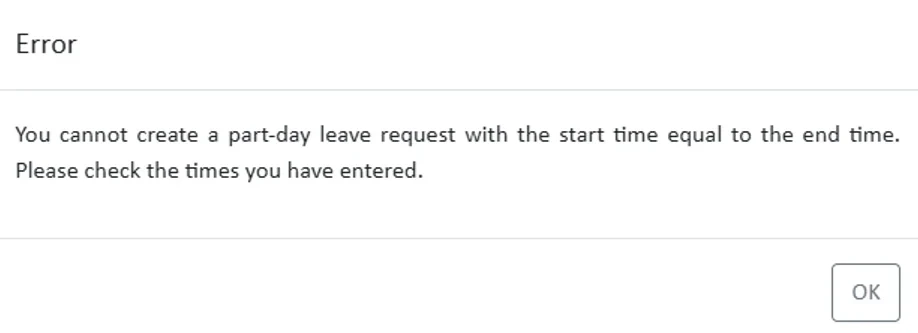
Pop-Up Warning for Invalid 0-Minute Part-Day Leave Requests
When a leave request is submitted for part of the day, and the selected start and end times total 0 minutes, the system will now display an error message prompting the user to adjust the entered times.
This enhancement has been introduced to help reduce human error when submitting partial day leave requests.
Forecasting Badge Comments
If you have the Forecasting feature enabled, you’ll now see a badge showing the percentage of your rostered wage cost against your budgeted wage cost.
These badges appear in green, yellow, or red based on the percentage and defined warning thresholds.
With this release, users can now add short comments against these percentage figures.
- Clicking on the badge opens a pop-up text area where users can add or edit notes.
- A note icon will appear on badges that have a saved comment.
- Hovering over this icon will display the budgeted cost, rostered cost, and any associated notes.
This feature helps provide context to forecasting variances and supports better communication across teams.
Images: Coming Soon
Prompt for Users with Unchanged Default Passwords
Users will now see a prompt at logon if they are still using a default password, such as “welcome” or their 'first name' encouraging them to update their password for improved security.
Compliance Module - Update - Answers Requiring Verification
Answers that require verification will now go through a staging process when updated. If a previously verified answer is changed—the original verified value will remain active for compliance and reporting purposes until the new answer is verified.
To help manage this more easily, attention icons have been added in both the Compliance and Staff modules. These icons alert users when a staff member has provided a new answer that still requires verification.
Internal Features
None in this Release
Disabled Features
None in this Release
StaffSync Features
Payment Tracking Option Now Available for Relievers
Relievers now have the ability to keep track of whether they’ve been paid by enabling the new Payment Tracking feature in their profile.
Images: Coming Soon
How to Enable Payment Tracking:
- Go to My Profile .
- Click on Payment Tracking.
- Toggle Payment Tracking to ON.
- Enter a start date – This is the date from which payment tracking will begin.
Note: Any timesheets dated before the selected start date will be ignored.
Using the Payment Tracking View:
- Once enabled, unpaid timesheets from the selected date onwards will appear on the reliever’s home screen.
- Relievers can click the paid/unpaid icon to update the status themselves.
Alternatively, relievers can also update their payment status via the calendar view.
Bug Fixes
The following software bugs will be resolved as part of this release. The items listed below are the titles of the related jobs. If you would like more detail on any of these fixes, please refer to your organisation’s Monday.com board or contact us directly.
- Reliever unassign/no-show drop down not working
- 'In Review' requests missing from reliever accounts
- Unable to switch off Weekly Reminder updates if no device
- Unable to Roster Staff After Partial Leave Request
- Leave request incorrectly be changed to be part day after timesheet modification
- Staff still show as available after the timesheet been reinstated.
- Job still show as 50% complete after reinstate timesheet
- Role Not Displaying Under "Requested" - After Reliever Sign Up
- Schedule leave toggles not allowing for department filters
- Timesheet didn't update correctly after leave request been declined
- File Uploads for all Question Purposes
- Payroll Rules not correctly handling nil contracted hours
- Leave type didn't update correctly after timesheet modification
- Rollback indivual employee requests to DataPay V2
- Leave day activity didn't update correctly after timesheet modification
- PNS Mt Albert - Projected Leave Balance
- Staff Requirements after midnight
- Timesheet Copy Creates Correct Times but Associates with Incorrect Shift in Roster
- Unable to update timesheet times from roster if there is a warning.


