
Release Notes - March 2025 - FULL RELEASE
We would like to inform you that Simplifi will be conducting a software release on Wednesday, March 26, 2025, at 10:15 PM.
The items included in this release have been added to our Test system for your review and testing.
To access the Simplifi Test system, please visit https://test.ghuwvsgnv3.wpdns.site and log in using your current credentials.
As Simplifi is a highly configurable system, please note that these are general release notes, and not all items may be applicable to your organisation.
Should you wish to discuss any of the following items in more detail or gain a deeper understanding of how this release will impact your organisation and its users, please do not hesitate to reach out to us on support@ghuwvsgnv3.wpdns.site.
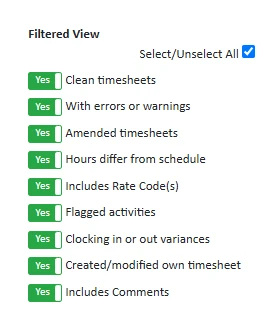
New "Select/Unselect All" Checkbox for Timesheets Filters
A new "Select/Unselect All" checkbox has been added to the timesheet filters to improve the user experience. This checkbox is selected by default, meaning all filter options will be checked when first accessing the timesheets. If unchecked, all filter options will be cleared, providing a fresh start. Conversely, checking it again will reselect all available filter options.
This update makes it easy to quickly view all your clean timesheets and then deal with timesheets that have errors with far fewer clicks.
User Monitoring and Notification Enhancements
Several updates have been implemented to enhance the monitoring of user activity and the notification process
- Category Monitoring Checkbox: A new checkbox has been added in the Categories section in JAS. This allows us to mark the specific categories we want to monitor for user activity.
- Email Notification List: We’ve introduced a list of email addresses in the System Settings. These emails will receive notifications of any user changes.
- Daily Notification Job: A daily job has been created to compile an email detailing all users created or archived within organisations that belong to the selected categories, and this email is sent to the designated recipients.
User Interface Text Improvements
In this release, all text elements across the employee self-service functions have been tidied up. This is to provide overall clarity and consistency in messaging, as well as to optimise the phone interface. These updates are purely text-based and do not affect any functionality, but they enhance the overall user experience.
New "Apps Downloaded" Column on Staff Export
An "Apps Downloaded" column has been added to the staff export. This new column displays the apps each staff member has downloaded, making it easier to track app usage and engagement across the organisation.
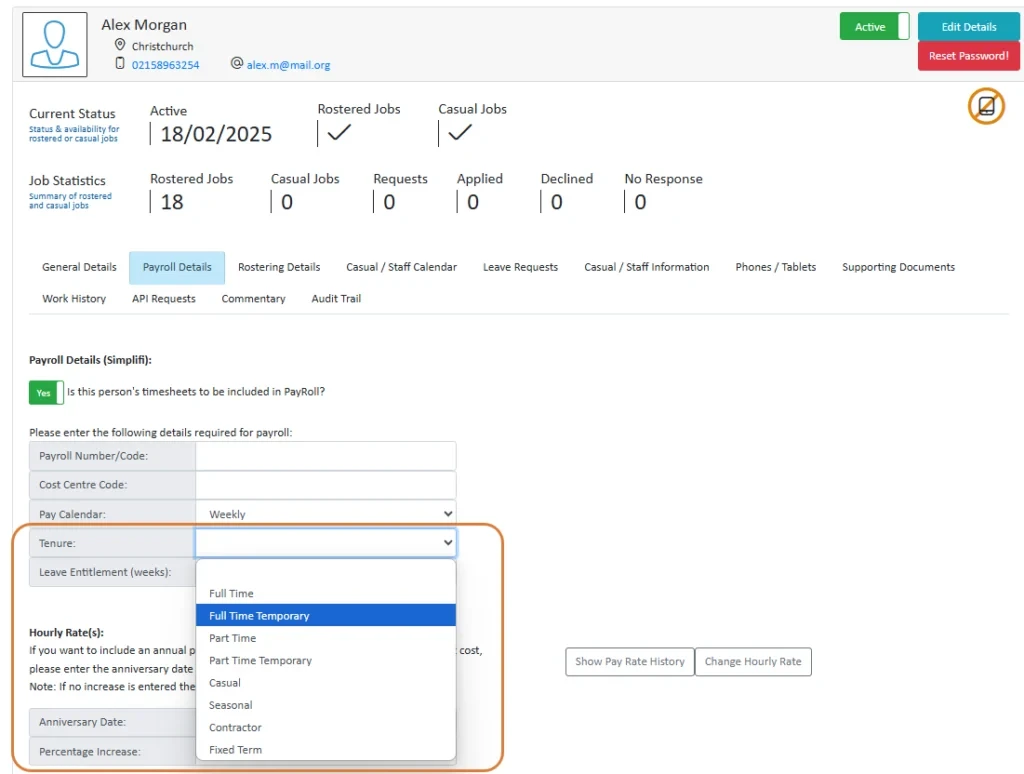
Employee Tenure Field Available for API Import
A new field is now available to import employee tenure via API from payroll systems. Datapay already includes this field, and iPayroll clients can create a custom field for it. Additionally, this field can be manually updated in staff profiles.
This update enables the creation of rules based on employee tenure, enhancing flexibility in payroll processes.
Enhanced Shift Department Selection
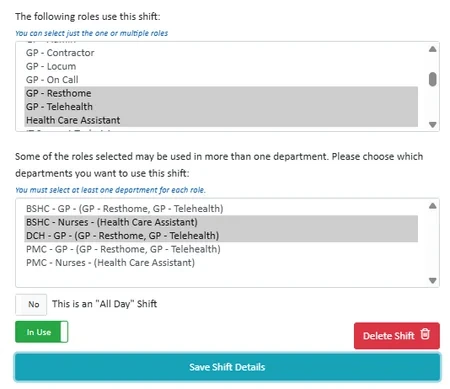
A new field has been added for selecting the rooms or departments that each shift applies to. This field now only displays rooms or departments that use the selected roles and updates dynamically when roles are changed. This allows the same roles to have different shifts in different departments.
For roles used exclusively in one room or department, that department becomes mandatory. For roles with multiple possible departments, users must select at least one, or an error message will appear.
Additionally, a release script has been implemented to upgrade all current shifts, ensuring they are automatically assigned to all departments for all selected roles. These assignments can be manually adjusted later if needed.
Schedule View Enhancement
Several updates have been introduced to the Schedule view to enhance the user experience and make managing staff easier:
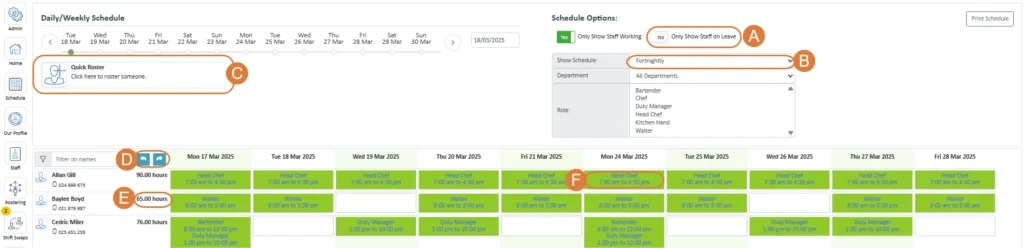
- A - "Only Show Staff on Leave" Toggle:
A new toggle option has been added to the schedule view, which defaults to "No". If this toggle is enabled it will show all staff on leave in the selected view. - B - Schedule - Fortnightly View
- C - "Quick Roster" Button:
A quick roster function has been added to the schedule, allowing you to add someone directly into the roster from the schedule.
- D - "Go Forward" and "Go Back" Buttons:
These buttons allow users to navigate through the schedule to view the next or previous day/week as needed. - E - Staff Total Paid Hours Summary:
In the weekly/fortnightly view, a total paid hours summary has been added, displaying the total number of paid hours for the period.
Note: The total hours will not be included in the printable version. - F - Editable Timesheets in Weekly / Fortnightly View:
For rostered or contracted shifts in the weekly/fortnightly view, clicking on a shift now opens an editable timesheet. After saving any changes, the view will automatically refresh. If this was a published job, the current job details view remains unchanged.
Standby Activity for Timesheets
A new option has been added to set a timesheet activities as a standby activity, allowing employees to be on standby while also being rostered to work a shift or on leave.
On the rostering screen, standby timesheets will now display as a phone icon to reduce confusion, especially when a staff member has multiple timesheets with the same initials. Hovering over the icon will show who is on standby.

When adding someone to the roster, the system will highlight those on standby for the selected role, display their standby hours, and move them to the top of the list for priority selection. If the staff member is already working other hours, these will also be shown. If multiple people are on standby, they will all be highlighted and moved to the top of the list. This ensures better organisation and prioritisation when assigning shifts.
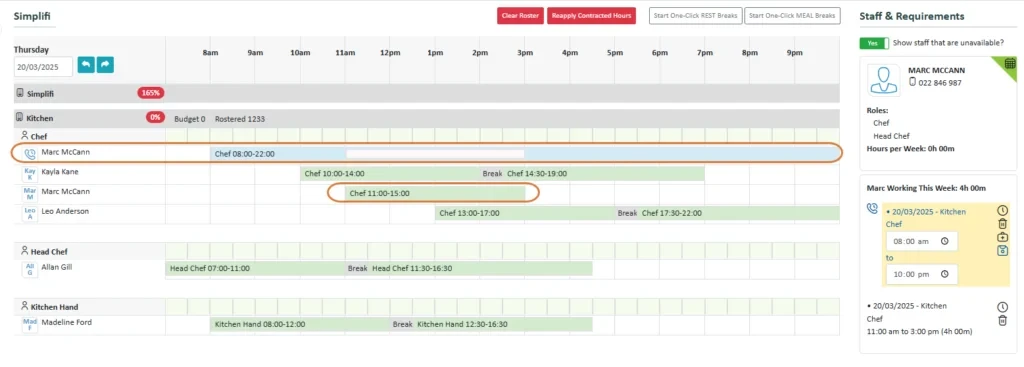
This feature can be used in situations where staff need to be on call, or if the organisation wants to place their first aid officers and fire wardens into a separate roster while the staff work their respective shifts.
New "Public Holiday Check" Report
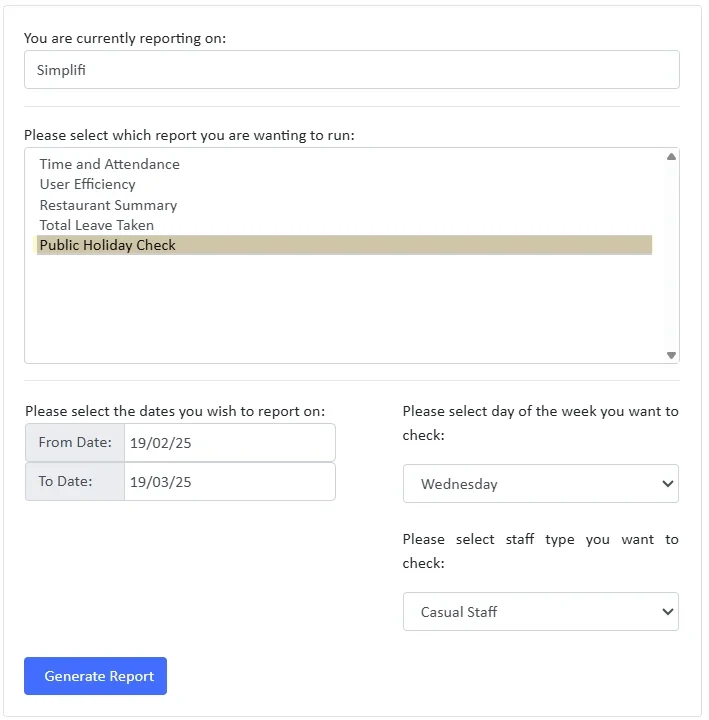
A new Public Holiday Check report has been added to the Reports module. This feature allows users to generate a report by selecting a date range, day of the week, and staff type. The report will display the paid days for staff on a given day of the week over the selected period.
This report is designed to assist in decision-making regarding whether a staff member is eligible to receive public holiday payments.

New "Total Leave Taken" Report
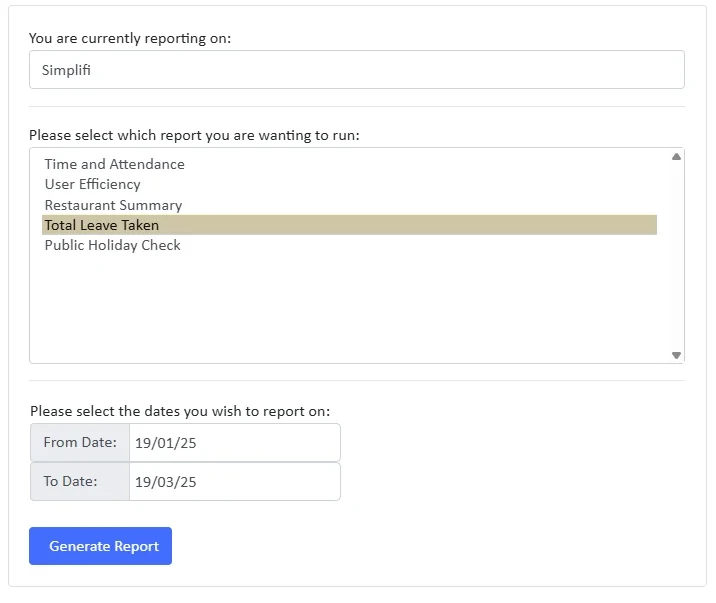
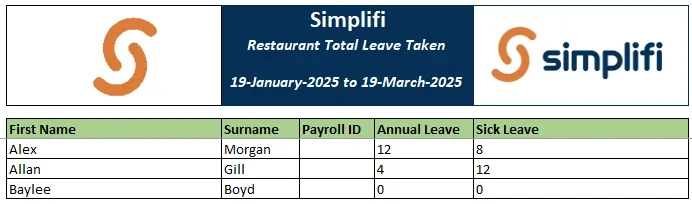
A Total Leave Taken report has been added to the Reports module. This report provides a summary of the total leave hours taken by staff for each leave type within a selected date range. It helps organisations track and manage leave usage more effectively.
Preventing Job Cancellation After Completion
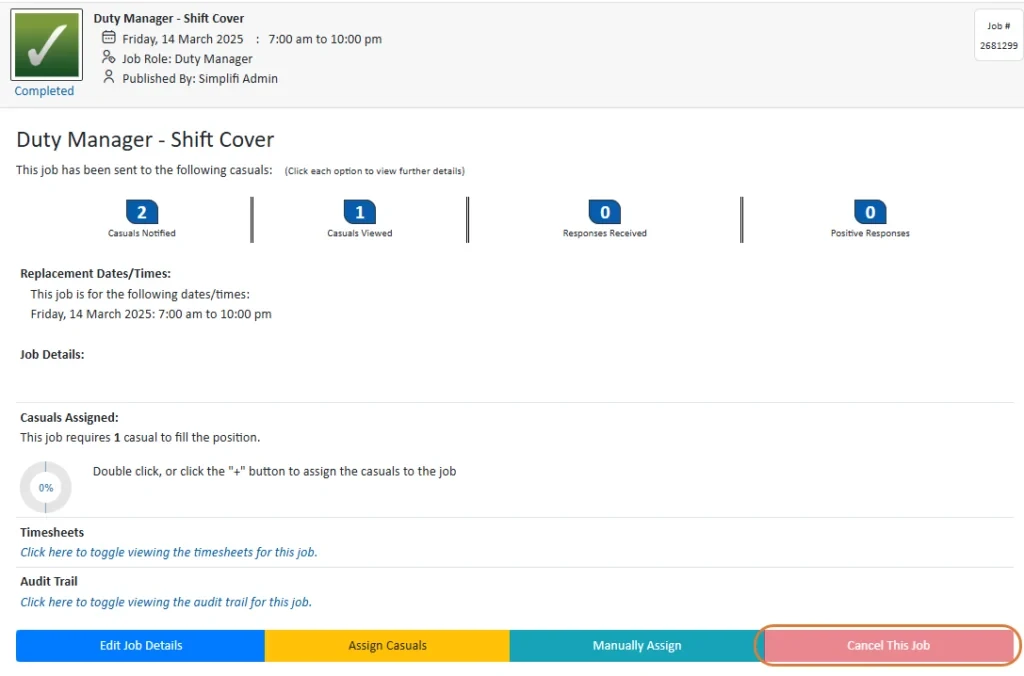
Previously, jobs could still be cancelled even after being marked as completed. To ensure the integrity of the system, the "Cancel This Job" button has now been disabled for completed jobs. This change ensures that once a job is finished, it cannot be cancelled and remains accurately recorded in the system.
Warning for Non-Preferred Reliever Assignment
This item is specific to StaffSync - Schools and Relievers were a broadcast service is used.
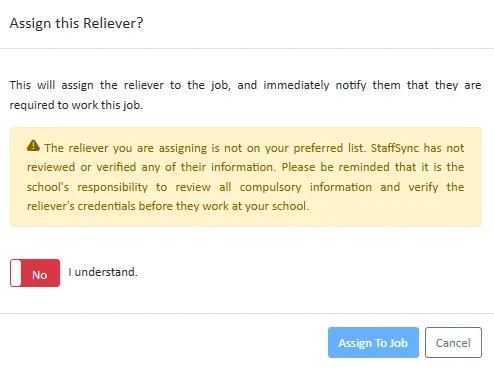
When a job is assigned to a reliever who is not on the school’s preferred list, a pop-up warning will now appear. This message will notify the user that the assigned reliever is not preferred by the organisation, and it is the organisation’s responsibility to verify the reliever’s information.
The user will need to switch the toggle to "Yes" to indicate they understand before they can assign the reliever to the job.
Warning Message for Unassigned Jobs
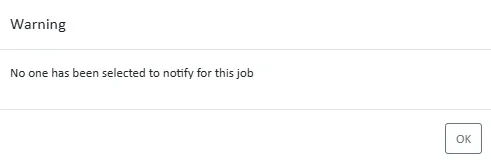
To prevent jobs from being accidentally published with no one notified, a warning message has been introduced that will pop up if no one has been selected for the job. You can still continue to publish the job if needed, but the warning will alert you to the issue.
Filter for Leave Approved by Timesheet Modification
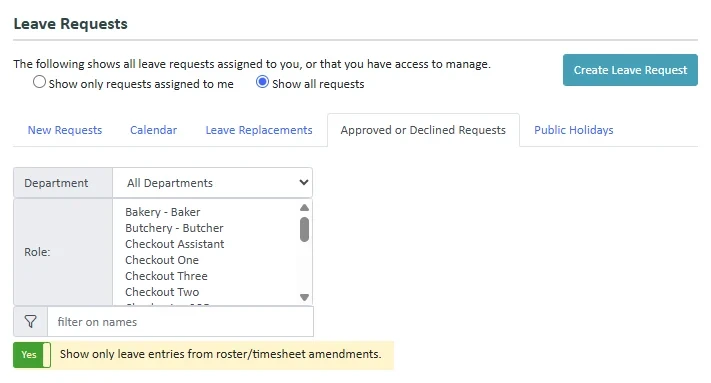
A new filter has been added to the Approved or Declined Requests tab within the Leave Module. This allows managers to toggle the view to display only leave entries created through roster or timesheet amendments, rather than standard leave requests. This enhancement provides greater visibility and control over leave approvals.
Projected Annual Leave Balance
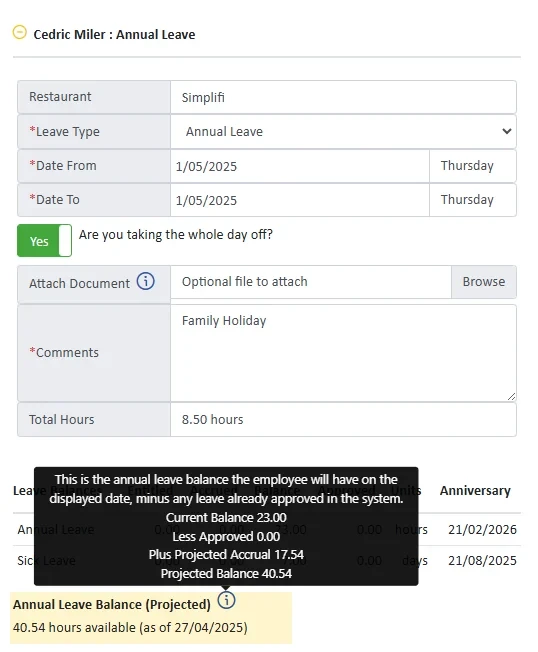
The system now provides staff members and approving managers with a projected annual leave balance at the date of the requested leave. This calculation considers contracted hours, work patterns, and any previously approved leave to give a more accurate view of available leave.
This feature is optional and can be enabled upon request.
An information icon will be displayed next to the balance. If you hover over it, you will see a breakdown of how this balance was calculated.
Future Leave Archived for Terminated Employees
Previously, when a staff member was terminated, all future leave requests were deleted. With this update, future leave requests will now be archived instead of deleted, allowing them to be restored if the staff member is reinstated within seven days.
While there is no visible change in the interface, archived leave requests will no longer appear in the Leave Module leave list. If the staff member is reactivated, all archived future leave requests will be reinstated.
Clock In/Out Across Any Kiosk
Staff members in selected roles can now clock in and out from any kiosk across the organisation. If the clocking location differs from the location recorded on the timesheet, the system will flag it as a variance for timesheet and payroll checking.
This feature is designed to support groups where staff work across multiple locations within the organisation.


