
Release Notes - May 2025 - FULL RELEASE
Wednesday, May 28, 2025, at 10:15 PM.
Major Enhancement to the Compliance Module
We’re pleased to announce a significant upgrade to the Compliance Module, designed to deliver stricter and more intelligent data validation before key actions such as rostering or job publishing can take place. This is an enhancement to our existing compliance module, allowing you to enforce absolute compliance where required.
Key Enhancements Include:
- Advanced Compliance Rules: Ability to set specific field type (e.g. number, date, text, upload, selector).
- Role-Based Restrictions: Set the field to warn or prevent rostering or publishing staff who do not meet compliance for the role.
- Conditional Questions: Display follow-up questions dynamically based on previous answers.
- Notifications & Reminders: Set reminders to keep staff and managers informed.
- Audit-Friendly Submissions (June 2025 Release): Verified employee answers are retained until new responses are re-verified, ensuring integrity.
- Clear Status & Export Tools (June 2025 Release): View compliance at a question, employee, or role level – and export to Excel for reporting.
Given the flexibility and depth of this module, we strongly recommend a walkthrough session to ensure you're getting the most out of it and to configure your compliance setup to suit your organisation’s needs
Custom Close Down Period Now Available
We’re excited to introduce a new enhancement allowing organisations to configure Custom Close Down Periods by business or department level.
Key Features:
- Targeted Application: Apply a close down period to specific businesses or departments within your organisation.
- Automated Handling: Choose between:
- Automatically replacing timesheet activity with a predefined replacement activity, or
- Generating a leave request using a configured leave type.
- Leave Manager Control: Generated leave requests will appear in a separate tab within the Leave module, allowing managers to review and approve them at their convenience.
- Balance-Aware Approvals: Managers can view leave balances before approving, ensuring only available leave is granted.
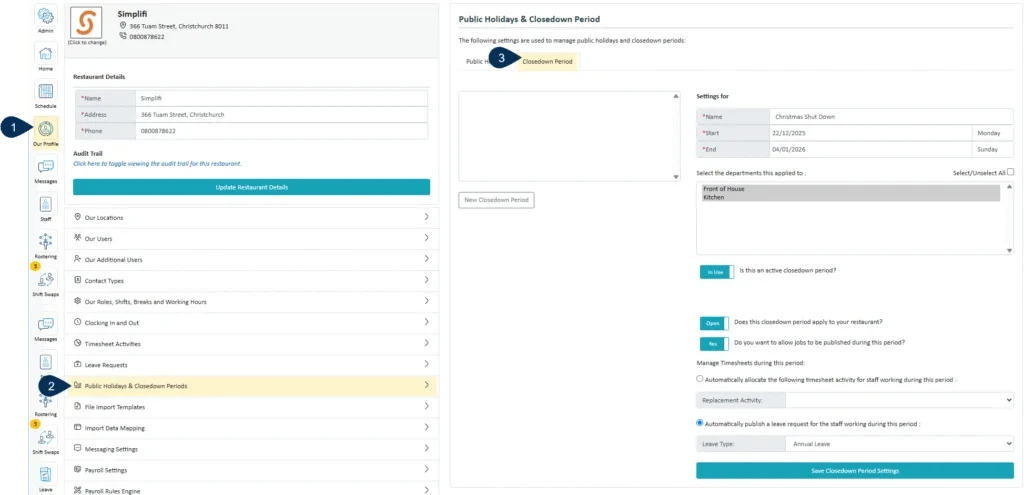
This feature gives you more flexibility and control during planned shutdown periods while keeping leave balances accurate and approval processes streamlined.
KIOSK Facial Recognition Now Supported
We’re pleased to announce that our KIOSK can now be configured to support Facial Recognition for staff clock-in and clock-out.
Key Features:
- Facial Profile Setup: Once enabled, an employee’s facial profile must be set up in the Staff module.
- Secure Clock-In: The KIOSK will recognise the employee and unlock their personal clock-in screen, allowing them to clock in/out of their shift or break with ease.
- Flexible Configuration:
- Allow staff to use their payroll ID as a fallback if no facial profile is set up, or
- Restrict the KIOSK so only facial recognition can be used for access.
This enhancement offers a secure, efficient way to manage attendance, especially in environments where a hands-free or touch-free option is preferred.
Dedicated Shift Swap Section for Staff
If your organisation is using the Shift Swap Module, employees would have previously submitted shift swap requests via the Home page or the Calendar.
We’re pleased to introduce a dedicated Shift Swap section, where employees can now create, view, and manage all shift swap requests and endorsements in one convenient location.
This enhancement will be automatically enabled with this release for all organisations currently using the Shift Swap functionality.
No action is required on your part — but if you have any questions or need support, please don’t hesitate to reach out to our team.
The Shift Swap module - Staff View has been designed to consolidate all shift swap functionality and now includes two clear tabs:
- My Submissions – Displays all shift swap requests initiated by the staff member, along with their current status.
- Others' Submissions – Displays requests submitted by other staff members that involve the logged-in employee.
If endorsement is enabled for your organisation, employees can click into these requests to endorse them directly.
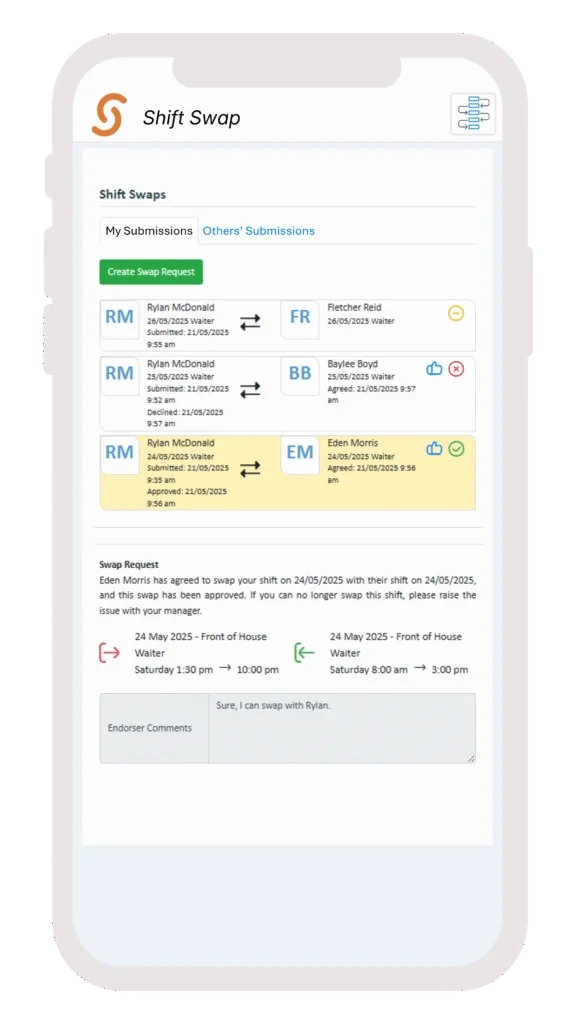
To create a new shift swap request from the dedicated Shift Swap section:
- Click Create Swap Request – A calendar view will open, displaying your scheduled shifts.
- Select a day with a shift – The shift details for that day will appear.
- Click the Swap icon to initiate a request.
- Complete the shift swap form and submit your request.
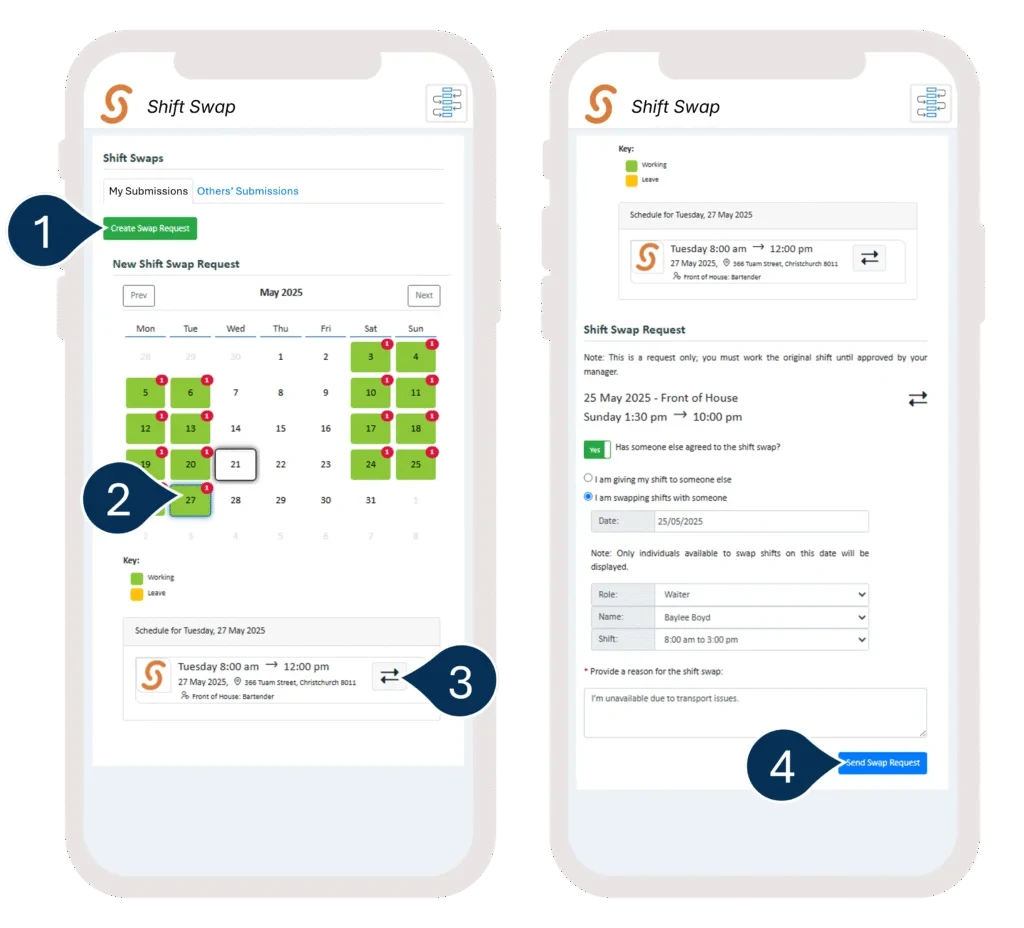
Already submitted a request for that shift?
The shift tile will be flagged. Clicking the Swap icon again will allow you to view or edit your existing request.
Quick Roster Only Access
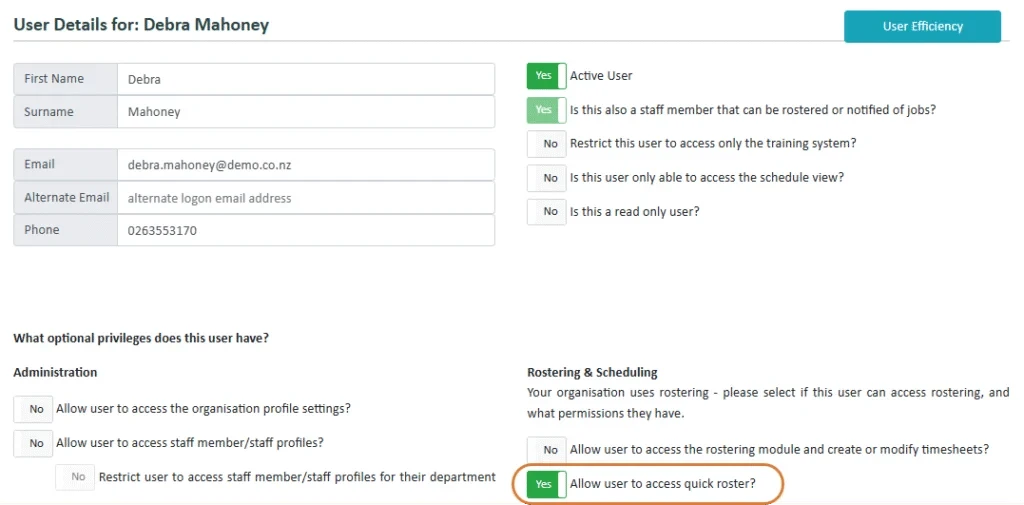
A new Quick Roster Access permission option has been added for organisation users. This allows users who do not have access to the full Roster module to still add staff using the Quick Roster feature, available on the home page or within the Schedule module.
Extended Payslip Viewing Period
The maximum number of days that payslips can be set to be viewable has been increased from 120 days to 365 days, allowing users access to payroll information for up to a full year. Please get in touch if you wish to extend your current setting.
Company-Level Messaging System Control
The Messaging System can now be enabled at the individual company level, rather than being set at the group level. This update allows companies to opt in independently, providing greater flexibility and control over communication preferences within multi-company groups.
Improved Message Interaction with Pop-Up Modals
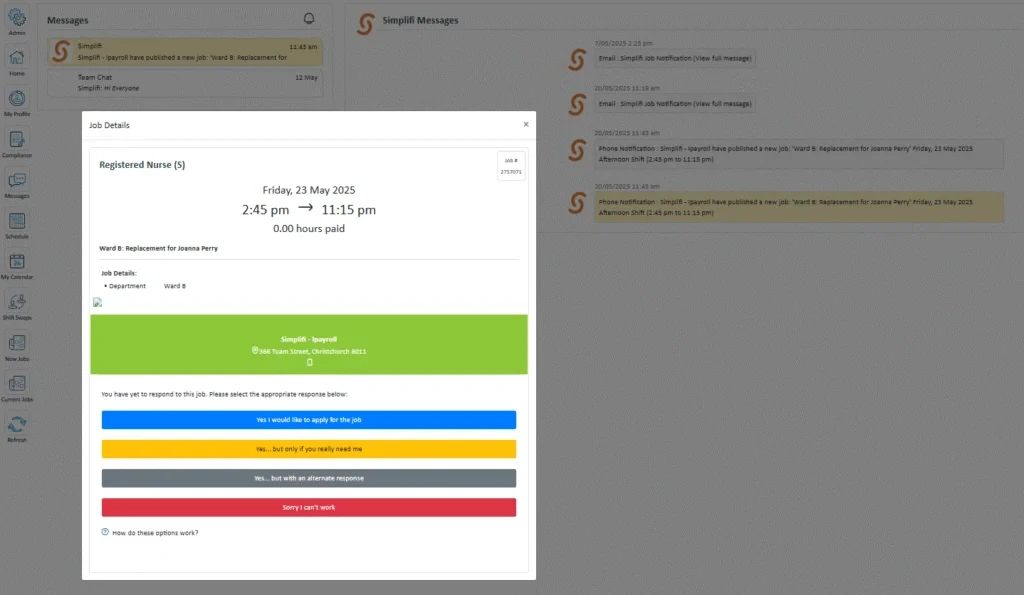
Functionality has been added to display email notifications or job push notifications in a pop-up modal for users. If the message relates to a job, users can apply or decline the job as before. When a message is clicked, it will now be highlighted, making it easier to see which message is currently being viewed.
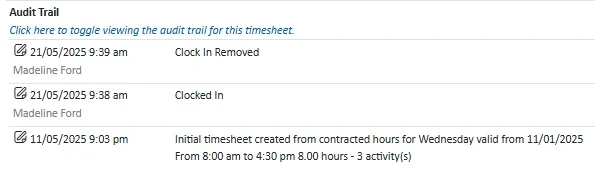
Audit Trail Update for Cancelled Clock-Ins
Cancelled clock-ins will now be recorded and displayed in the timesheet audit trail.
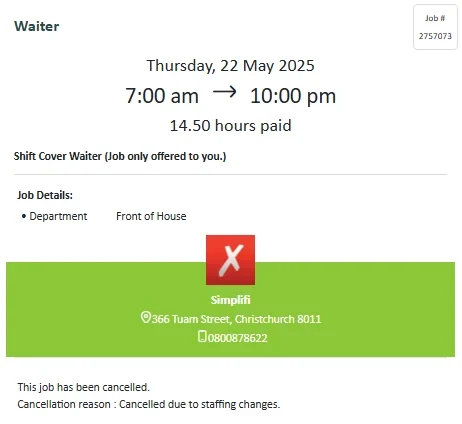
Job Cancellation Reason to appear on the Job
The cancellation reason for a job will now be displayed directly on the job itself, rather than in the job notification.
Internal Features
Integration with New Teaching Council API
Simplifi has been updated to integrate with the new Teaching Council API. This change enables access to the latest services provided by the council and ensures continued compliance with current standards.
Addition of Payroll ID Column to Organisation Reports
A new column titled Payroll ID has been added to both the Summary Report and the Organisation Anniversary Report.
Updates to Help Desk – User Support Call Topics button
A new Support Call Topics button has been added to the User Support Log in JAS. Clicking this opens a form where topics can be added or managed.
In the Support Call form, the title combo box now shows all non-archived topics. The web user search has also been improved to allow multi-word searches.
Updates to Help Desk – User Support Log Portal Filter
A new portal filter has been added to the User Support Log in JAS.
Additionally, the size of the notes column has been reduced, allowing the last two columns (User and Resolved) to be visible without scrolling.
Disabled Features
None in this Release
StaffSync Features
None in this Release
Bug Fixes
The following software bugs will be resolved as part of this release. The items listed below are the titles of the related jobs. If you would like more detail on any of these fixes, please refer to your organisation’s Monday.com board or contact us directly.
- Future leave against contracted hours is not working for staff when All Company is selected.
- Payroll Rules Engine issue when a shift crosses midnight.
- "String is too long" error when editing a message group name to be too long.
- Deleted timesheets are being regenerated due to staff being unassigned and reassigned to the job multiple times.
- Leave request days are incorrect after contract hours are changed.
- White menu text is appearing in the temp staff view due to the organisation’s dark background text attribute not updating correctly.
- An exception error occurs due to an invalid leave date input.
- Approved leave total hours are incorrect due to amendment timesheets being created.
- Shifts are appearing under incorrect departments.
- Leave is showing as approved in the calendar while still pending.
- Shifts are not pulling through to contracted hours.
- Shift swap endorsement error.
- Publishing a job to find a replacement is loading the previously published job instead of creating a new one.
- The Has Leave Requests module checkbox is always ticked in JAS, regardless of whether the organisation uses the Leave module.
- When shadowing a staff member who is also an org user, the email search results aren’t displaying correctly. Even when the "Staff" option is selected, it still shows "Org User" results.
- Total contracted hours did not update correctly in the Roster Staff view.


