
Release Notes - September 2025 - FULL RELEASE
Wednesday, September 24, 2025, at 10:15 PM.
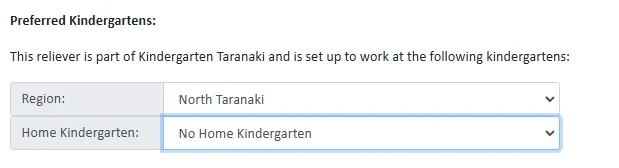
Ability to Remove Home Kindergarten for Preferred Relievers
You can now reset a staff profile to No Home Kindergarten when there is no longer an applicable Home Kindergarten. This is especially useful for relievers who have been in a Long Term Relieving (LTR) role (where a Home Kindergarten is needed for payroll rules), but then return to their standard casual reliever role where a Home Kindergarten isn’t applicable.
Approving Timesheets will Automatically Move to the Next Timesheet
When you approve a timesheet, you will now be automatically moved to the next timesheet in the list awaiting approval.
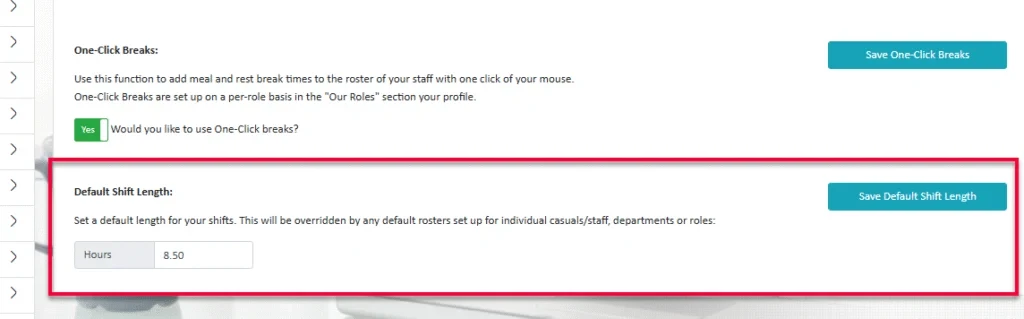
Default Length of Shift at Company Level
You can now set a default shift length for your whole organisation. If your organisation is a head office, all sites under your head office will have this default shift length.
This is found in Rostering Settings under Our Profile.
If there are no roster defaults for a staff member and they are added to a roster, a new shift will be created for them with the default shift length which has been set.
If there are no default shift times set, we use the work day start/finish times of the room/org as the start and end of the shift. If the organisation operates 24hrs, we default to 9am - 5pm.
Historic Not Working Rosters to be removed from Rostering Details in Staff Profiles
Contracted Hours will now only show "Not Working" for future hours, to clearly indicate the end of the current set of working hours. Once the "Not Working" set becomes current, it will no longer display.
Improvements to Rostering Settings - Room Details set up
We’ve improved Room Details set up by replacing the role toggle system with a multi-select filter, making it easier to focus only on the roles you need.
We’ve also added a filter for Default Rosters. If a room or department has several defaults, you can now choose which one to edit individually, instead of having them all display at once. This keeps the screen tidy and easier to work with.
Include "Reports To" Field in Audit Trail and Staff Export
The "Reports To" field has been added to the audit trail for Timesheet and Leave approvals, providing better visibility of changes to reporting relationships.
The Staff Export now also includes new columns for the "Reports To" fields, making it easier to quickly identify reporting lines and confirm each employee’s manager.
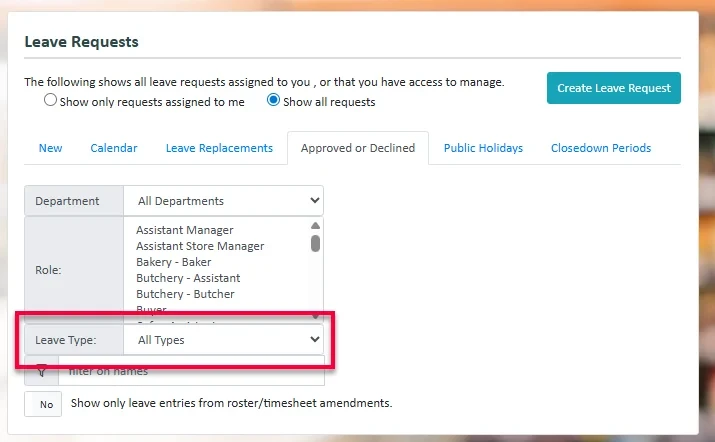
Leave Type Filter - New Leave/Approved or Declined Tab
You can now filter leave requests by Leave Type.
While on the New leave request and the Approved or Decline leave requests tabs there is a new filter that allows you to select the leave type of a leave request.
Link to Leave Request
We have added the ability for you to view a full leave request when processing timesheets.
If you have access to the Leave module, you will be given an option to View Full Request when inspecting the Leave Details.
When you click on the View Full Request button, a new tab will open with the Full Leave Request details shown.
New Feature – Cost Codes updated with Clocking Information
We’re rolling out the first stage of this feature for staff working across multiple sites.
You can now set the organisation/site for each activity within a timesheet. This flows through to the rules engine, meaning cost codes are now calculated per activity rather than per timesheet. This makes it easier to track costs when staff are working across different sites.
For now, the organisation/site still needs to be manually set on the timesheet. Next month, we’ll release the second part of this feature: staff will be able to clock in at different sites, and a new activity will automatically be created under the correct organisation for cost codes—no manual steps needed.
Notification of Pending Timesheets
You can now enable notifications of any pending timesheets which need approvals. This is enabled under Payroll Settings, anyone with access to Payroll Settings is able to enable notifications and set the notification time.
If each site controls their own payroll, a new Notifications tab will appear with the associated toggle for notifications.
Individual users are able to subscribe or unsubscribe with a new toggle found in User Settings.
At the designated time the user will be sent a notification alerting them to how many timesheets they have pending approval. Users who have no pending timesheets will not be sent a notification.
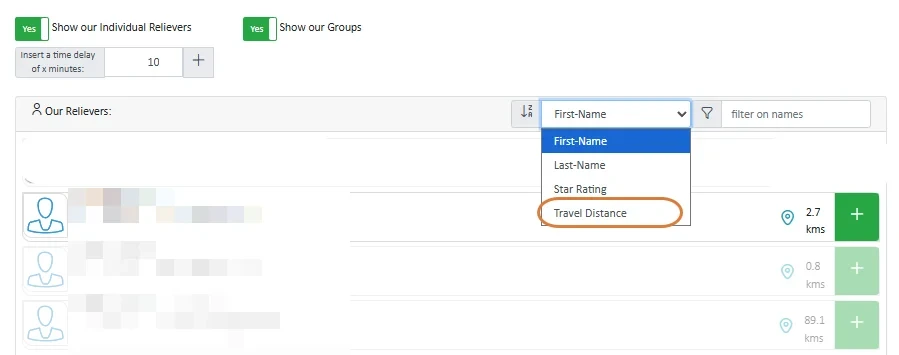
Location Display when Publishing Jobs
When publishing a job, you can now see the travel distance alongside each person. You can also filter by travel distance, making it easier to prioritise people that are closer.
Reports Enhancement: Job Published Date and Time Added
A new column called Published Date has been added to the Job Data report. This displays the exact date and time a job was published. The Published Date column is also available in the filters section, making it easier to search and sort jobs by when they were published.
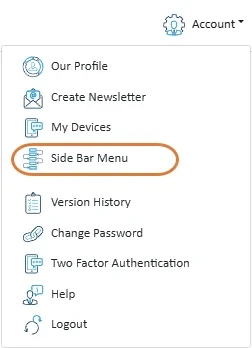
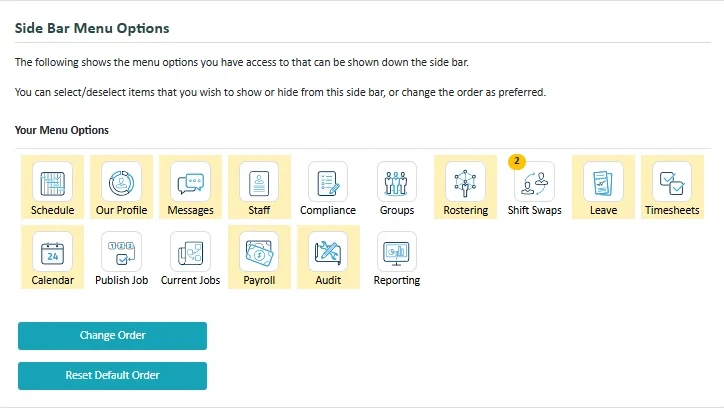
Sidebar Menu Updates
We’ve added two new options to the Sidebar Menu:
- Change Order – lets you enter editing mode to drag and drop sidebar buttons into your preferred order.
- Reset Order – restores the sidebar to its default layout.
Please note: the Admin and Alert buttons (when visible) will always remain fixed at the top and cannot be moved.
View Notes from Relievers After Job Assignment
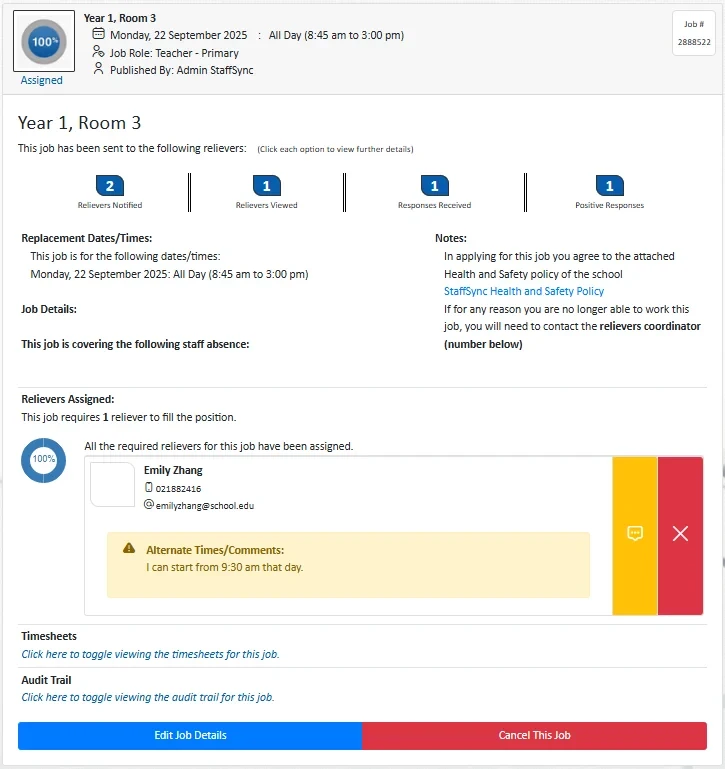
A new option has been added to make it easier to see any notes left by relievers or casual staff when they accept a job.
Previously, if a reliever accepted a job but added alternate times or left a comment, that information could no longer be viewed once the person was assigned to the job.
A new “View Notes” button now appears in the Relievers Assigned section of the job notification page, but only if notes have been provided. Clicking this button will show or hide the notes, so administrators can review the conditions or time changes at any time.
Internal Features
Update to Reliever Request Notification Emails
Notifications for preferred reliever requests will now only be sent to the email addresses listed in the “Who should be notified” box.
Previously, if this box was left empty, the system would automatically send these emails to the organisation’s primary user. To avoid confusion, this automatic fallback has been removed.
Disabled Features
Nothing in this release.
StaffSync Features
Archiving of Users When Switching to PAYG
When a school is switched to PAYG (Pay As You Go), all users except the Prime User will now be archived straight away.
As part of this release, an upgrade process will also run across all schools that are already set to PAYG. This process will archive all non-prime users in those schools too, so that records are consistent.
New Dashboard on Home Screen for Schools
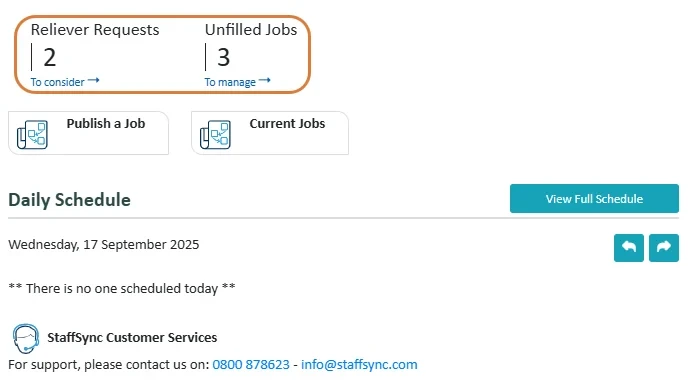
The home screen for school users has been refreshed with a new dashboard view, similar to the one used in organisations with rostering.
The dashboard shows:
- Unprocessed reliever requests – click to go straight to the reliever screen.
- Unfilled jobs – click to open the unfilled jobs window.
The unfilled jobs count respects the setting “only view and assign jobs they published”. This means the number shown will only include the jobs the user has permission to manage.
Validation Check on Industry Role Select
There is now a validation check so that a school must have at least one active role selected.
Bug Fixes
The following software bugs will be resolved as part of this release. The items listed below are the titles of the related jobs. If you would like more detail on any of these fixes, please refer to your organisation’s Monday.com board or contact us directly.
- Hours to pay not calculating correctly when editing times via the Roster
- Leave View - Daily Contracted Hours View
- Payroll User Access modifcation
- User can delete timesheet/remove staff member from shift booked at anothe ...
- Leave Requests switching to Part Day incorrectly
- Hours can still be modified on Timesheet Details
- Start unscheduled work errors
- Inconsistent Application of custom break times for staff
- User switch box stuck on last option
- Rostering Summary showing negative value for Hours Worked
- Timesheets not being rechecked if Activity changed to "Send To Payroll"
- More robust validation on Region form
- Reliever assigned to two jobs after assigned job time was edited
- Question validation failing due to duplicate IDs
- Disabled fields / areas are not fully disabled
- Room select doesn't disappear from job wizard even if all rooms are archived


