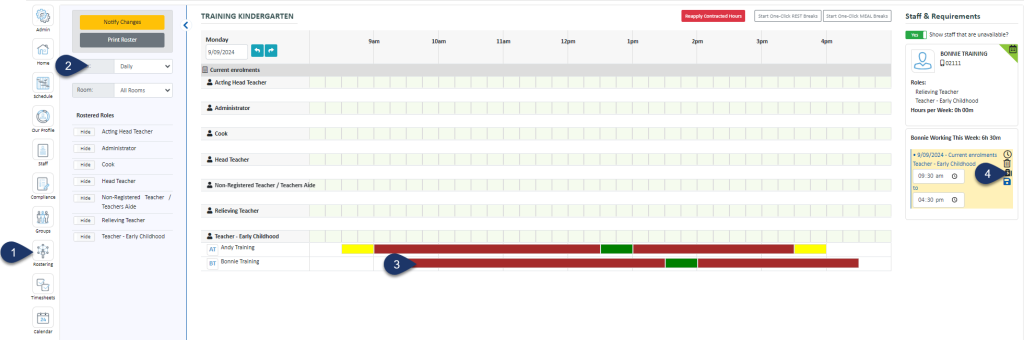
Select the Daily View (this can be done from the weekly view too)
Select the Shift Bar
Select the First Aid Kit icon to mark an absence
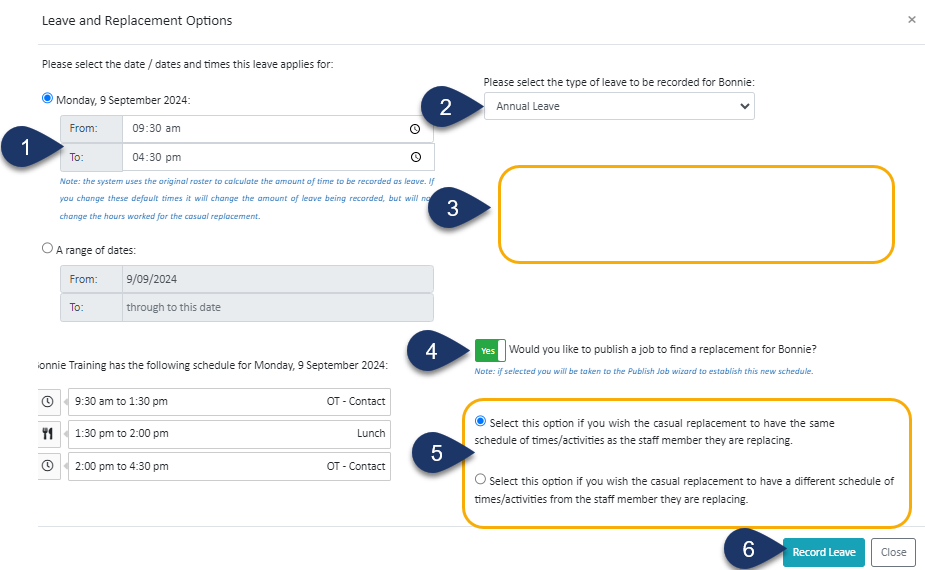
Choose the time of absence - or leave as it is if the person is away for the whole shift
Select the type of leave
The Employee's leave balance will be displayed here
Switch the toggle to a No, if you do not wish to find replacement for this person. If left as Yes, when you select Record Leave you will be taken to the Job Publishing screen to publish the shift out to your casuals
If the toggle is Yes, here you can choose if the casual replacing this person does the exact shift as the absentee or something different
Select Record Leave
Ready to see how Simplifi can improve workforce management for your New Zealand team?
Say goodbye to complex rosters, compliance headaches, and payroll errors. With Simplifi, you can streamline scheduling, stay compliant and save valuable admin time.