
New Multi-period Shift Option for Secondary Schools
What’s New
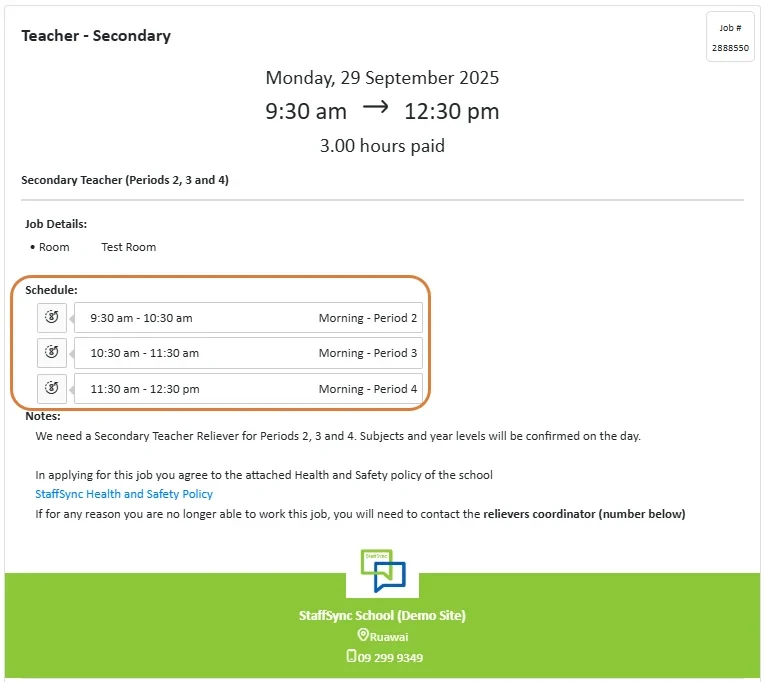
Secondary school jobs can now show the exact periods that need cover, instead of just listing a block of time. This means jobs may only include certain periods (e.g. Periods 2, 3 and 4) rather than a full day.
Why It Helps
- No guesswork – you’ll see straight away which periods you’re needed for
- Accurate hours – payroll hours match the periods you work
- More flexible options – jobs may cover just a couple of periods, or a full day, depending on what’s required
What You’ll See
When a job is published using periods, the job details and notifications will clearly show:
- The period numbers (e.g. Period 2, Period 4)
- The start and finish times for those periods
- The total hours you’ll be paid for
This makes it easier to plan your day and know exactly what to expect before you accept a job.
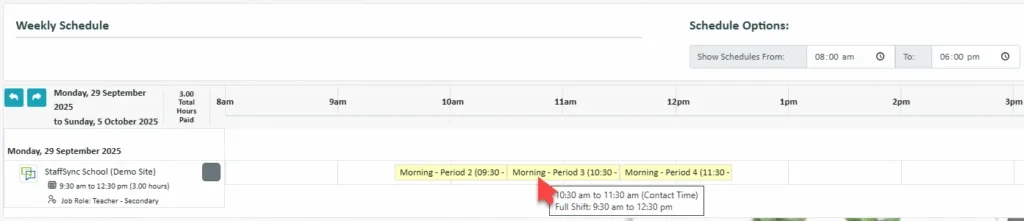
The schedule bar has been updated so that if an activity is linked to a period, the period name will now appear alongside the time. This makes it easier for you to quickly see which periods you’re scheduled for, as long as the school has this feature enabled.
If you have any further questions, please contact your School Administrator or reach out to StaffSync Customer Support.
Email: support@staffsync.com
Phone: 0800 878 623


