
Getting Started
Being cloud based StaffSync can be accessed on any computer and your phone via the StaffSync app
Computer Access

- Open any internet brower
- Enter the website in the address bar
https://apps.staffsync.co.nz/
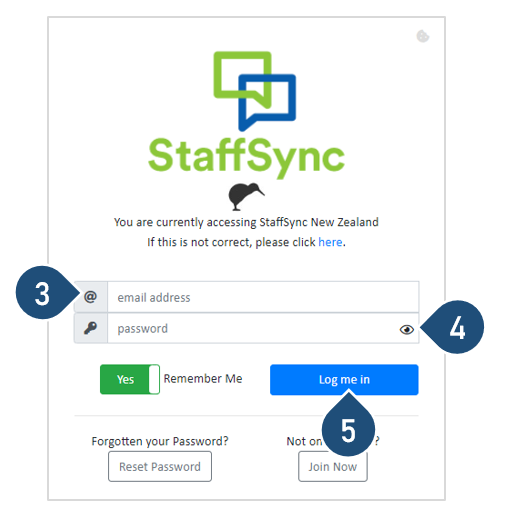
3. Enter you email address, Click Next
4. Enter the password
5. Click Log me in
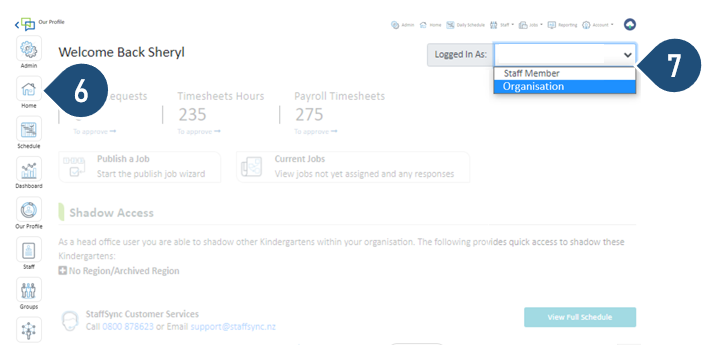
6. Select the Home Icon
7. Logged in As: Select the type of User Access
LOGGED IN AS: User Access
Staff Member – This access will allow you to manage your own account as a Staff Member, i.e. Apply for your own leave
Organisation Name – This access will allow you to manage your team, i.e. Create and Modify Rosters, Approve Timesheets, Approve Leave Requests.
Phone Access
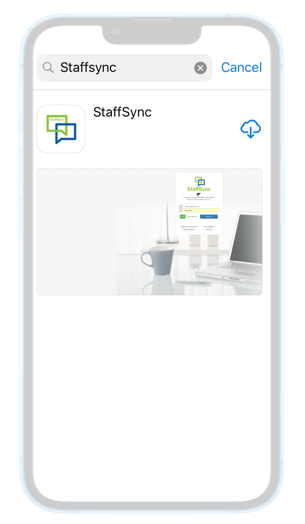
- Download the StaffSync App - You will find the StaffSync app on the Playstore for android phone users and the Appstore for Apple users
- Allow the app to send you notification
- Select New Zealand
- Log in using your user email and password
- Enter a device name and select Save Device Name
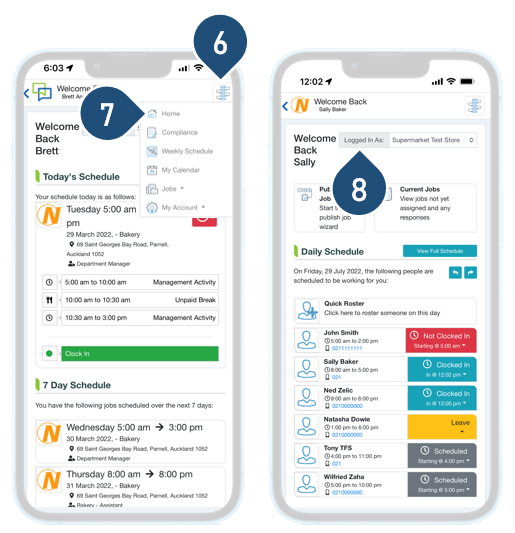
6. Select the Menu Icon
7. Select Home
8. Logged in As : Select the Type of User Access
LOGGED IN AS: User Access
Staff Member – This access will allow you to manage your own account as a Staff Member, i.e. Apply for your own leave
Organisation Name – This access will allow you to manage your team, i.e. Create and Modify Rosters, Approve Timesheets, Approve Leave Requests.


